Create a professional invoice in minutes — the fields to include, numbering, tax, and a free PDF invoice generator. Step-by-step.
To make an invoice, add your business details, your client's details, a unique invoice number, the date and due date, an itemised list of what you're charging for, the tax (if any), and the total — then send it as a PDF. You can do this in a template, in Word or Excel, or fastest of all in a free invoice generator that fills the calculations for you. Here's the complete, step-by-step guide.
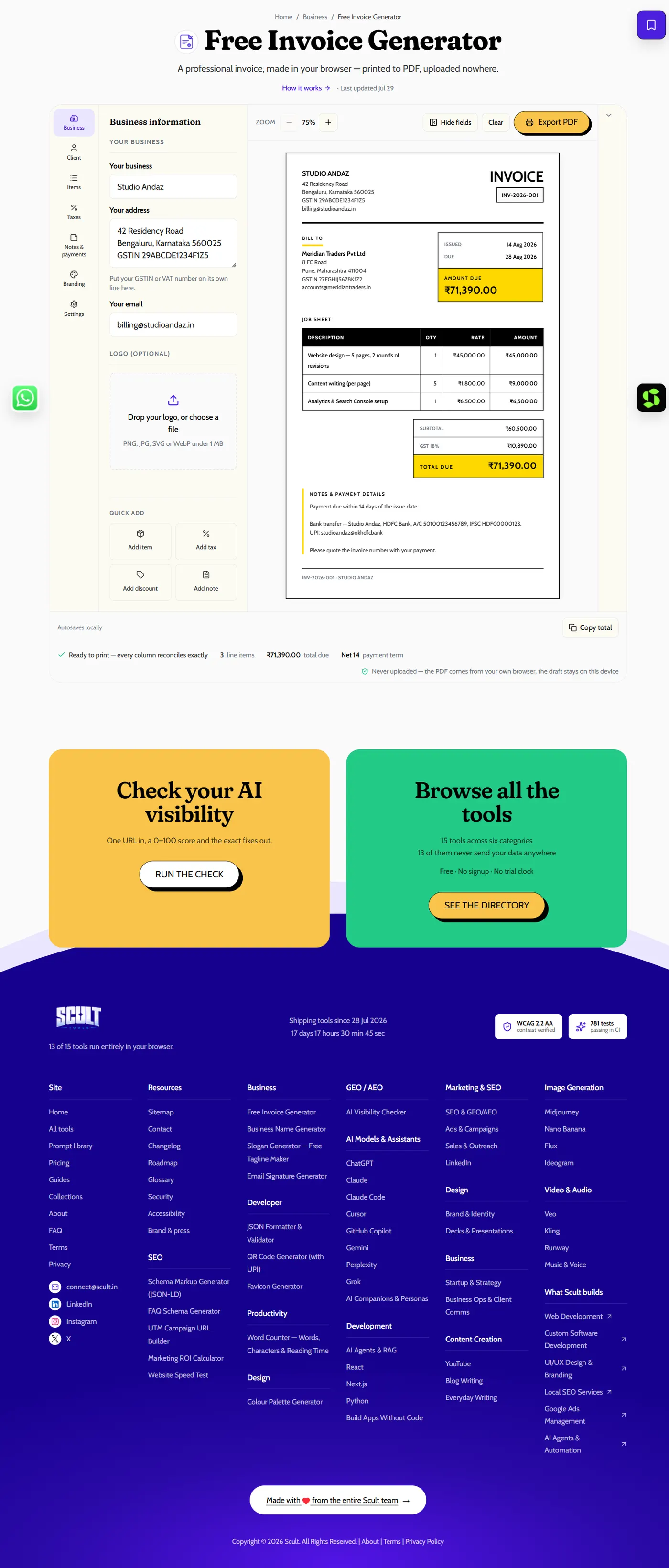
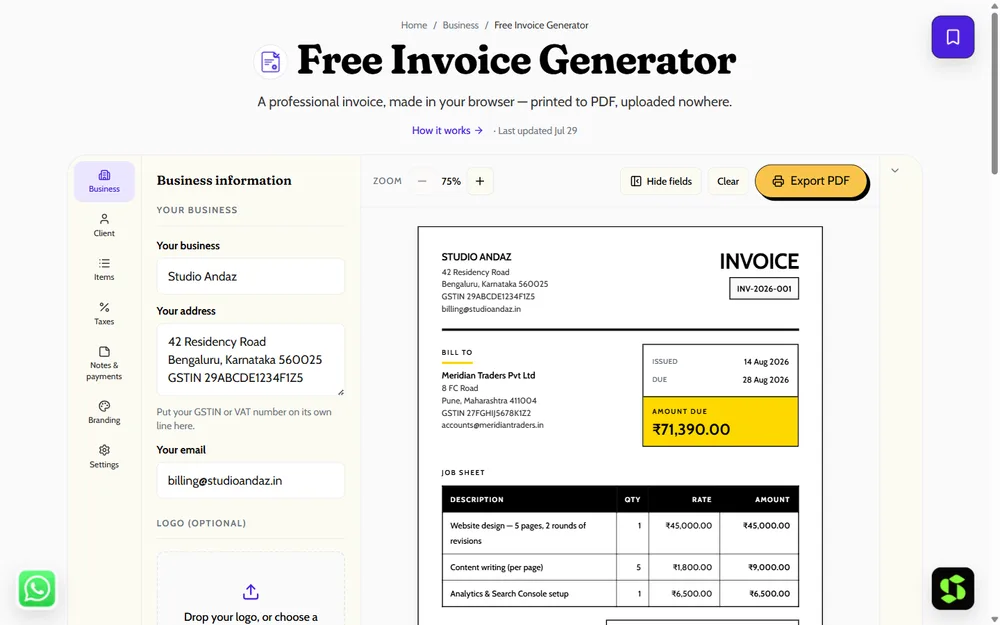
The Invoice Generator: fill in business and client details on the left, watch the formatted invoice build in real time on the right, then export straight to PDF.
What an Invoice Is, and Why It Matters
An invoice is a formal request for payment that records what was sold, to whom, how much is owed, and by when. It's essential for three separate reasons: it's what actually gets you paid on time (a vague verbal agreement or a casual message rarely does), it's the record your accounting relies on for tax and bookkeeping, and it's the paper trail that protects you if a payment dispute ever arises. Not sure how it differs from a bill or a receipt specifically? See invoice vs bill vs receipt for the precise distinction.
Step 1: Add Your Business Details
Include your business name, logo, address, contact information, and your tax ID (your GSTIN, if you're registered for GST in India). This is what makes the invoice look professional and identifies exactly who is requesting payment — an invoice without clear sender details looks amateurish and can genuinely slow down payment from a cautious client's finance team.
Step 2: Add the Client's Details
Include the client's name, address, and contact information. For business clients, use the exact legal entity name they'll need for their own accounting — a mismatch here is a common, avoidable reason an invoice bounces back for correction.
Step 3: Add a Unique Invoice Number
Use a sequential numbering scheme (INV-2026-001, for instance) and never reuse a number. This single detail matters more than it seems: it's what lets both you and your client's accounts team reference the invoice unambiguously later, and a skipped or repeated number is one of the first things a careful accounts team flags as suspicious.
Step 4: Add the Issue Date and Due Date
State both dates explicitly — "issue date" and "due date" (for example, "Net 15" meaning due 15 days from issue). Never rely on vague phrasing like "payment appreciated promptly," which isn't an actual due date and gives a client no concrete deadline to work against.
Step 5: List Every Item Charged
For each item or service, include a clear description, the quantity, the rate, and the resulting line total. Itemizing rather than presenting a single lump sum lets a client's finance team verify your math rather than simply trusting your total on faith — which matters for getting paid without a round of clarifying questions first.
Step 6: Add Tax, If Applicable
Apply GST, VAT, or your relevant local tax, and show it as its own clearly labeled line rather than folding it silently into the total. If you're GST-registered in India specifically, see GST invoice format and rules for the full, detailed breakdown of what a compliant tax invoice needs.
Step 7: Show the Total Clearly
Display the subtotal, the tax amount, and the grand total as three distinct, clearly labeled lines — never just a single final number with no visible breakdown of how it was reached.
Step 8: Add Payment Details and Terms
Include your bank details, UPI ID, or a payment link, along with your accepted payment methods and your stated terms (including any late-fee policy). An invoice with nowhere obvious to send the money sits unpaid in someone's inbox until they think to ask you how.
Step 9: Send It as a PDF
Export and send as a PDF rather than an editable document — this preserves your exact formatting regardless of what software or device the recipient opens it with, and it looks more professional than a Word document a recipient could accidentally (or deliberately) edit.
A Complete Worked Example
To make the nine steps concrete, here's what a finished invoice actually looks like end to end for a freelance web designer billing a small business client:
- Business details: Priya Sharma Design, Bengaluru, priya@example.com, GSTIN (if registered)
- Client details: Meridian Retail Pvt. Ltd., Bengaluru
- Invoice number: INV-2026-014
- Issue date: 15 March 2026 · Due date: 30 March 2026 (Net 15)
- Line items:
Description Qty Rate Amount Homepage redesign 8 hrs ₹2,000 ₹16,000 Product page templates (×3) 12 hrs ₹2,000 ₹24,000 - Subtotal: ₹40,000 · GST (18%, intra-state): ₹3,600 CGST + ₹3,600 SGST · Total: ₹47,200
- Payment details: UPI ID, bank account, or a payment link
- Terms: Net 15, 2% late fee after due date
Every field maps directly back to one of the nine steps above — nothing here is exotic, it's simply all nine steps filled in with real numbers for a single, representative transaction.
The Fastest Way to Do All of This
Rather than manually formatting each of the nine steps above in a blank document, the free Invoice Generator fills every field, calculates totals and tax automatically, adds your logo, and exports a clean, ready-to-send PDF in under a minute. Nothing you enter is uploaded anywhere. See the complete field list in what to include on an invoice if you want the exhaustive checklist version of the steps above.
Handling Recurring Clients Without Rebuilding Every Time
If you bill the same client repeatedly — a monthly retainer, a recurring project — save a copy of a completed invoice as your starting template rather than rebuilding the layout from scratch each cycle. Update the invoice number, dates, and line items, and leave the business details, payment information, and formatting untouched. This alone removes most of the repetitive work from recurring invoicing, and it's exactly the workflow a free generator's saved-details or duplicate-invoice feature is designed to speed up further.
GST Invoices in India
If you're GST-registered, your invoice needs to be a proper tax invoice, carrying your GSTIN, the correct HSN or SAC codes, and the correct CGST/SGST or IGST split depending on whether the sale is within your state or across state lines. See the complete GST invoice format guide for the exact mandatory fields. This is general guidance, not tax advice — verify specifics against current GST rules or with a qualified professional for anything that genuinely matters for your filing.
Invoicing by Business Type: What Changes
The nine-step structure above holds for every kind of business, but a few details shift depending on what you actually do:
Freelancers and solo consultants typically bill by hours or a flat project fee rather than physical units — expect your line items to read as "Consulting — March 2026, 20 hrs" rather than a quantity-times-unit-price product breakdown. See invoicing tips for freelancers for the fuller playbook on getting paid reliably once your basic invoice is in place.
Product and retail sellers itemize by SKU or product name with real quantities, and — if GST-registered — need the correct HSN code attached to every product line, since tax authorities classify goods and services differently for reconciliation purposes.
Agencies and B2B service providers often bill recurring retainers or project milestones, and benefit from referencing the underlying contract, statement of work, or purchase order number directly on the invoice — corporate accounts payable teams frequently require a PO number before they'll process payment at all.
E-commerce and subscription businesses typically generate invoices automatically as part of checkout or a recurring billing cycle, often pairing the invoice with an automatic receipt the moment payment clears, rather than the days-or-weeks gap typical of manually invoiced freelance work.
Invoice vs Quotation vs Proforma Invoice
Before an invoice even exists, most transactions pass through earlier-stage documents worth distinguishing clearly. A quotation (or estimate) is a non-binding statement of expected cost given before work starts, so a prospective client can decide whether to proceed — it creates no payment obligation. A proforma invoice looks like a real invoice (same layout, same itemization) but explicitly isn't a demand for payment yet; it's commonly used to confirm expected costs before a final order, for customs documentation on international shipments, or so a client's finance team can process an advance payment before the actual invoice is issued. Only the final document — the real invoice, following the nine steps above — carries a genuine payment obligation and uses your sequential invoice-numbering scheme. For the fuller breakdown of adjacent document types including bills and receipts, see invoice vs bill vs receipt.
Why Professional Formatting Isn't Just Cosmetic
It's tempting to think of an invoice's visual polish as unrelated to whether you get paid — the numbers are the numbers, regardless of layout. In practice, a clean, well-organized invoice with your logo, consistent formatting, and clearly separated sections genuinely does get processed faster by a client's accounts team, because it's easier to scan and verify at a glance. A cluttered or inconsistent layout, by contrast, forces the reader to work harder to locate the total, the due date, or the payment details — and that extra friction, multiplied across every invoice a busy accounts team processes, is enough to measurably slow down when yours specifically gets paid.
Tips to Get Paid Faster
- Send it promptly, and to the actual right person or department — not a general inbox where it can sit unnoticed.
- Set clear, short payment terms rather than an open-ended, vague request.
- Include easy payment options — UPI, bank transfer, or a payment link — so paying takes one step, not several.
- Follow up politely a few days before the due date, since most late payments come from simple forgetfulness rather than genuine refusal to pay.
See invoicing tips for freelancers and small businesses for the fuller playbook once your basic invoice is sorted.
Invoicing Software vs a One-Off Generator: A Closer Look
It's worth being specific about where the line actually sits, since "just use software" is easy advice that doesn't fit every business. A generator suits you if you send invoices occasionally, to a handful of recurring or one-off clients, and don't need automated reminders because you're comfortable following up manually. Dedicated software earns its subscription cost once you're issuing invoices to dozens of clients monthly, need recurring billing to fire automatically on a schedule without your manual involvement, or want payment status synced directly into your bookkeeping so you're not reconciling two separate systems by hand. Most freelancers and small businesses stay comfortably in the first category for years — there's no inherent virtue in "graduating" to paid software before your actual invoicing volume demands it.
A Common Mistake Worth Naming Directly
The single most common invoicing mistake isn't a missing field — it's math that doesn't reconcile. Line items that don't sum correctly to the stated subtotal, or a tax figure that doesn't logically follow from the subtotal, is the fastest way to get an invoice bounced back for correction, and every round trip adds real days to when you actually get paid. Whichever method you use to build an invoice, double-check the arithmetic before sending — or use a generator that calculates it for you automatically and eliminates this specific failure mode entirely.
Invoice Templates vs. Software vs. a Free Generator
There are really three ways to produce an invoice, and each fits a different stage of business:
- A blank template (Word, Excel, Google Docs) is free and flexible, but every field has to be formatted and calculated by hand each time, and it's the method most prone to the arithmetic mistakes described below.
- A dedicated invoice generator (like the free tool linked throughout this guide) gives you a pre-built, correctly formatted layout, automatic tax and total calculations, and a clean PDF export — with no software to install and no ongoing cost, which makes it the right fit for most freelancers and small businesses sending invoices occasionally to a handful of clients.
- Full invoicing or accounting software adds recurring billing, automated payment reminders, multi-currency support, and integration with bookkeeping — worth the subscription cost once you're sending a high volume of invoices monthly or need to track many outstanding payments simultaneously.
Most businesses can comfortably stay on a free generator far longer than they expect, and only need to graduate to paid software once invoice volume or the complexity of accounts-receivable tracking genuinely demands it — see "when to upgrade" in invoicing tips for freelancers for the specific signals that it's time.
How Invoice Requirements Differ by Country
The core fields — sender, recipient, invoice number, dates, itemized charges, total — are close to universal, but tax-specific requirements vary meaningfully by jurisdiction. In India, GST-registered businesses need GSTIN, HSN/SAC codes, and the CGST/SGST/IGST split described above. In VAT jurisdictions (much of Europe, the UK, and elsewhere), invoices typically need a VAT registration number and the VAT rate/amount shown separately. In the US, there's no federal invoice-format mandate, but state sales tax rules can apply depending on what's being sold and where. If you invoice internationally, treat this section as a prompt to check your specific buyer's and your own jurisdiction's rules rather than assuming one format works everywhere — ⚠️ this is general orientation, not tax or legal advice for any specific country.
How Long to Keep Invoice Records
Most tax authorities require businesses to retain invoice records for a specific minimum period — commonly somewhere in the range of several years — to support audits, tax filings, and dispute resolution. Keeping digital copies (a folder of PDFs, or your invoice generator's saved history) makes this trivial compared to relying on paper records, which are easy to lose and impossible to search quickly when you actually need to find one. ⚠️CHECK your specific jurisdiction's required retention period rather than assuming a generic timeframe applies.
Invoicing for International Clients
If your client is in a different country, state the currency explicitly on the invoice — never assume it's obvious — and be clear upfront about who absorbs any international transfer or conversion fees. Some cross-border transactions also count as exports for tax purposes in your home jurisdiction, which can carry different documentation rules than a domestic sale; if this applies to you regularly, it's worth a one-time conversation with a tax professional to set up the right template rather than re-deriving the rules on every invoice.
What Happens When an Invoice Goes Unpaid
Even a well-formatted, correctly numbered invoice can go unpaid past its due date — this is normal, and worth having a plan for rather than being caught off guard by. The typical escalation path is: a polite reminder a few days before the due date, a firmer follow-up on or shortly after the due date referencing the specific overdue amount, and — if your stated terms included one — application of a late fee. Persistent non-payment beyond that point is a business decision (whether to pause further work, involve a collections process, or write it off) rather than an invoicing question, but it starts from having sent a clear, professional invoice with unambiguous terms in the first place — which is exactly what the nine steps above are designed to produce.
Invoicing Mistakes That Cost the Most Time
Beyond the arithmetic mistake already covered above, a handful of other errors are worth naming because they're common and each one costs real days of delay. Sending an invoice to the wrong contact or a general inbox rather than the specific person who processes payments is one — it can sit unread for a surprisingly long time. Forgetting to attach the invoice at all, or attaching an outdated draft version instead of the final one, is another surprisingly frequent mistake once you're sending several invoices a week. And failing to keep your own copy of what you sent, so that when a client claims they never received it, you have no dated proof to point back to, turns a simple mix-up into a harder-to-resolve dispute. Each of these is avoidable with a small habit: confirm the right recipient once per client, double-check the attached file before sending, and keep a saved or archived copy of every invoice you issue.
A Final Pre-Send Checklist
Before you hit send on any invoice, run through this in under a minute: does the math on every line item add up correctly to the subtotal? Is the invoice number unique and does it follow your sequence? Are both the issue date and due date present and correct? Is the tax line (if any) calculated and labeled clearly? Are your payment details accurate and tested (no typo in a bank account number or UPI ID)? Is it saved and sent as a PDF, not an editable file? A quick pass through these six questions catches the overwhelming majority of the mistakes that would otherwise bounce an invoice back for correction and cost you real days in payment delay.
Automating Invoicing as You Grow
A single freelancer sending a handful of invoices a month can comfortably use a free generator and a simple manual tracking sheet indefinitely. The calculus changes once you're issuing dozens of invoices monthly, managing recurring retainer billing across multiple clients, or spending real time chasing overdue payments — at that point, automated recurring invoices, payment reminders, and reconciliation against your accounting system stop being a nice-to-have and start being the thing that actually saves you hours every month. This is usually the point where a purpose-built billing system, rather than a one-off generator, starts paying for itself.
Frequently Asked Questions
How do I make an invoice for free?
Use the free Invoice Generator — fill in your details and download a finished PDF, with no signup and nothing uploaded anywhere.
What must an invoice include, at minimum?
Your business details, the client's details, a unique invoice number, the issue and due dates, itemized charges, applicable tax, the total, and your payment terms.
How do I number my invoices correctly?
Sequentially and uniquely — a pattern like INV-2026-001, -002, and so on — and never repeat or skip a number, since both are common red flags for a client's accounts team.
Can I make a GST invoice with this same process?
Yes — use GST mode in the generator and add your GSTIN along with the correct CGST/SGST or IGST split. See the full GST invoice format guide for every required field.
Should I send an invoice as a PDF or an editable file?
Always as a PDF — it preserves your exact formatting regardless of the recipient's software, and it can't be accidentally or deliberately altered the way an editable document could be.
Can I turn a paid invoice into a receipt?
Not directly — an invoice requests payment and a receipt confirms it, so they serve opposite purposes. Marking a paid invoice "PAID" works informally, but issuing a separate receipt avoids any ambiguity; see invoice vs bill vs receipt for the full distinction.
What's the fastest way to make a professional-looking invoice?
A dedicated invoice generator, rather than a blank Word or Excel template — it handles formatting, numbering, and calculation automatically, producing a clean result in a fraction of the time.
Do I need special software to send invoices as a freelancer?
No — a free invoice generator and a PDF are entirely sufficient for most freelancers and small businesses; dedicated invoicing software becomes worth it mainly once you're managing high invoice volume or need recurring billing.
What happens if I make a mistake on an invoice after sending it?
Send a corrected version clearly marked as a revision (referencing the original invoice number), rather than silently resending — this keeps your numbering sequence intact and avoids confusing your client's accounts team.
How does invoicing differ between a freelancer and a registered company?
The core structure is identical — the main difference is that a GST-registered business adds tax-specific fields (GSTIN, HSN/SAC, the CGST/SGST/IGST split), while an unregistered freelancer keeps to the standard checklist without a tax-ID line.
How do I handle a recurring client without redoing the whole invoice each time?
Save a completed invoice as your starting template, then update only the invoice number, dates, and line items each cycle — your business details, payment information, and layout stay the same.
Do I need a written contract before invoicing a client?
It's not strictly required to issue a valid invoice, but agreeing scope, price, and payment terms in writing before work begins is the single biggest factor in avoiding a payment dispute later — see invoicing tips for freelancers for the full reasoning.
How is a proforma invoice different from a real invoice?
A proforma invoice looks identical to a real one but isn't a demand for payment — it's used to confirm expected costs before an order is finalized, and it never uses your actual sequential invoice-numbering scheme.
Need branded invoicing or a full billing system built for your business? Scult builds custom software that goes beyond a one-off invoice generator.


