UTM parameters explained — the 5 tags, what each does, and how to track campaigns properly. With examples + a free UTM builder.
UTM parameters are small, standardized tags you add to the end of a URL that tell your analytics tool exactly where a visit came from — the source, the medium, and the specific campaign behind each individual click. When someone clicks a tagged link, tools like Google Analytics 4 record those values automatically and precisely, so you know exactly which channel, ad, email, or post actually drove that specific visit — instead of guessing from a general, uninformative "referral" or "direct" bucket. This is the complete, detailed guide to UTM parameters: what they genuinely mean, how to correctly build them, and how the resulting tracking data actually flows all the way into your marketing reports.
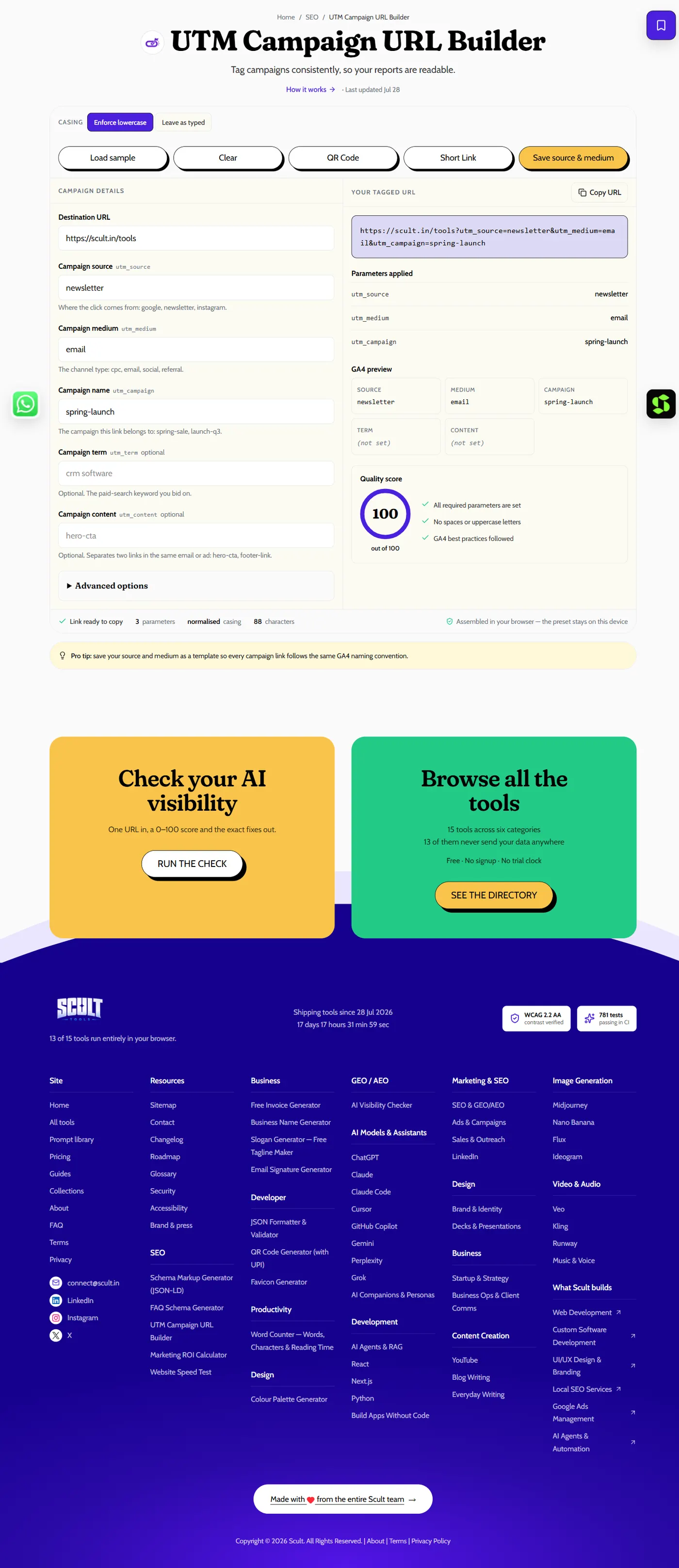
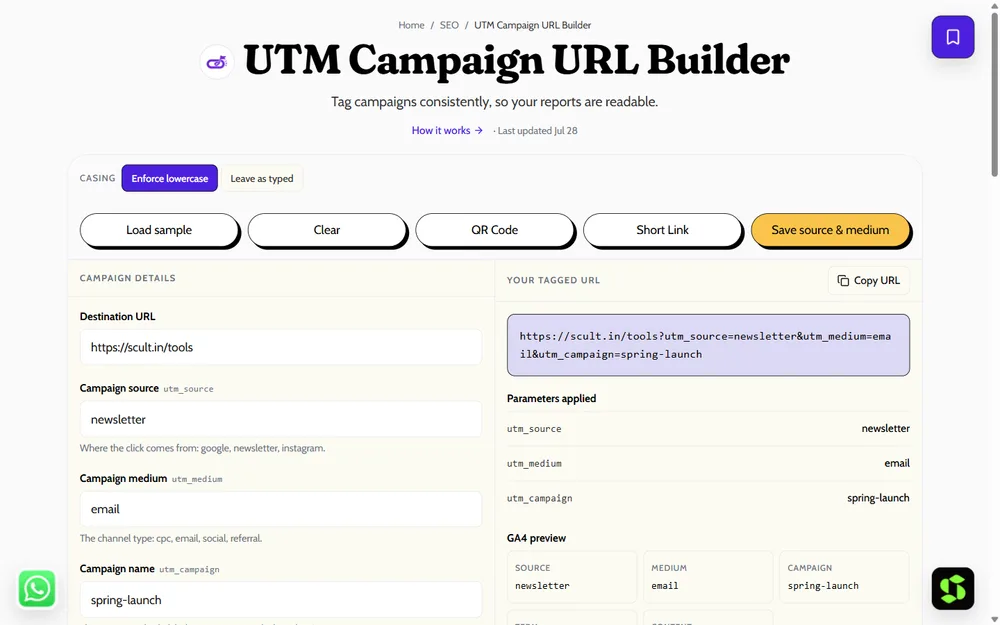
The UTM Campaign URL Builder: fill in source, medium and campaign, and it generates a correctly tagged URL plus a live preview of how each parameter will appear in GA4.
What Does UTM Mean?
UTM stands for Urchin Tracking Module, named after Urchin — the web analytics software Google acquired in 2005, which became the foundation for Google Analytics. The name has stuck around for two decades purely as a historical artifact; it has nothing to do with what the parameters actually do today. If you see "UTM codes," "UTM tags," or "UTM tracking" used elsewhere, they all refer to the same thing: the standardized query parameters covered in this guide.
Why UTM Tracking Exists in the First Place
Before UTMs, marketers trying to measure a specific campaign's performance had genuinely few good options: they could look at raw referral data (which only tells you which domain sent traffic, not which specific ad or email), or rely on each platform's own siloed reporting (which doesn't let you compare a Facebook ad's performance against an email campaign's in one unified view). UTM parameters solved this by putting the tracking information directly into the URL itself — platform-agnostic, readable by any analytics tool, and entirely within the marketer's control rather than dependent on what each individual platform chooses to report. That's still the core value proposition today: one consistent way to measure performance across every channel you use, in a single unified report, rather than stitching together five different platforms' native dashboards by hand.
The 5 UTM Parameters, Explained
| Parameter | What it tracks | Example value |
|---|---|---|
utm_source |
Where the traffic originated | google, newsletter, facebook |
utm_medium |
The general channel type | cpc, email, social, referral |
utm_campaign |
The specific campaign name | diwali-sale-2026 |
utm_term |
The paid keyword (search ads) | running-shoes |
utm_content |
Which specific link or creative | header-cta, footer-cta |
The first three — source, medium, and campaign — are the essentials every tagged link should have. utm_term and utm_content are optional, used when you need finer detail: utm_term for the specific paid search keyword behind a click, and utm_content when you're running two versions of the same ad or two links in the same email and need to tell them apart.
Where Do UTM Parameters Actually Come From?
UTM parameters are part of a URL's query string — the portion after the ? that web servers and browsers have long supported for passing arbitrary key-value information to a page, originally designed for things like search queries and form submissions rather than analytics specifically. Google Analytics adopted this existing, general web standard and defined a specific set of parameter names (utm_source, utm_medium, and the rest) that its own system knows to look for and parse automatically. This is why UTM parameters work everywhere on the web without any special server configuration — they're not a Google-specific technology requiring anything installed on your site; they're standard URL syntax that Google Analytics (and now many other analytics tools) simply agreed to read consistently.
utm_source vs. utm_medium: A Common Point of Confusion
New to UTM tracking, it's easy to conflate source and medium, since both seem to answer "where did this come from." The cleanest way to separate them: source answers "which specific place" (facebook, newsletter, google), while medium answers "what general category of channel" (social, email, cpc). Two campaigns can share the same source but differ in medium — a Facebook organic post (source=facebook, medium=social) versus a Facebook paid ad (source=facebook, medium=paid-social) — which is exactly the distinction that lets you separate paid Facebook performance from organic Facebook performance in the same report, even though both technically "came from Facebook."
Anatomy of a Tagged URL
https://example.com/?utm_source=facebook&utm_medium=paid-social&utm_campaign=diwali-sale-2026
The ? character starts the query string; each parameter is a key=value pair, and multiple parameters are joined with &. Reading this URL: the visit came from facebook (source), through a paid social placement (medium), as part of the diwali-sale-2026 campaign. Anyone looking at this URL — or the resulting analytics data — can immediately tell what drove the click, without needing any other context.
How UTM Tracking Actually Flows
- You build a tagged link for a specific campaign, using the free UTM Builder rather than typing the parameters by hand.
- You share the tagged link wherever the campaign runs — an ad, an email, a social post, a partner's site.
- Someone clicks the link, and their browser sends the full URL — parameters included — to your website.
- Your analytics tool reads the parameters from that URL and attributes the resulting session to the exact source, medium, and campaign you specified.
- In GA4 specifically, this shows up as Session source/medium and Session campaign dimensions in your reports — see how to track campaigns in GA4 for the exact report paths.
UTM Parameters and Link Length
A tagged URL is meaningfully longer than its untagged version — a URL with all five parameters populated can easily double or triple in character length. This matters practically in a few places: some platforms (older SMS gateways, character-limited fields) may need a link shortener that preserves the full destination and parameters rather than truncating them, and a very long visible URL can look unpolished in a printed or visually exposed context (a flyer, a business card). The UTM Builder generates the full tagged link regardless, and pairing it with a link shortener is a separate, optional step for contexts where the raw length actually matters visually or technically.
Do UTM Parameters Affect SEO?
Not for external links, and this is worth being precise about since it's a common worry. UTM-tagged links pointed at your site from an ad, email, or social post don't hurt your SEO — Google recognizes the tagged URL and the untagged version as the same page via your canonical tag, provided you have a correct self-referencing canonical set up. What you should avoid is tagging internal links on your own site (navigation links, internal cross-links between your own pages) — doing that can overwrite the original traffic source in your analytics every time someone clicks around your site, corrupting your own data for no benefit, since UTMs are meant to track traffic arriving from outside your site, not movement within it.
UTM Parameters for Small Businesses vs. Larger Marketing Teams
A solo business owner running a handful of campaigns a month has genuinely different needs than a large marketing team running dozens simultaneously across several people — but the underlying principles scale down (and up) cleanly either way. A small business can get by with a simple shared note listing their few standard source/medium values; a larger team needs the fuller documented convention, a shared builder tool, and periodic audits covered elsewhere in this guide. What doesn't change with scale is the core requirement: consistency, applied by whoever is building links, however many people that happens to be.
Common Beginner Questions About How UTMs Physically Work
Two questions come up constantly from people building their first tagged link: does the order of parameters in the URL matter (no — utm_medium before utm_source works identically to the reverse; analytics tools parse by parameter name, not position), and do UTM parameters need to be URL-encoded (spaces and special characters do, which is exactly why the best-practice rule is to avoid them by using hyphens and simple lowercase words in the first place — sidestepping the need for encoding entirely rather than handling it manually).
When UTM Data Disagrees With What a Platform Reports Natively
It's not unusual for GA4's UTM-derived numbers to differ somewhat from a platform's own native reporting (Meta Ads Manager's reported clicks versus GA4's sessions for the same campaign, for instance) — this isn't necessarily an error on either side. Different systems measure differently: a platform might count a click the instant it happens, while GA4 counts a session only once the destination page actually loads and fires its tracking, and factors like ad blockers, slow page loads, or a visitor closing the tab before the page finishes loading can create a click that a platform recorded but GA4 never did. Expect some variance between the two rather than assuming one number is simply wrong because it doesn't match the other exactly.
UTM Parameters vs. Other Tracking Methods
UTM parameters aren't the only way to pass tracking information in a URL — Google Ads' auto-tagging uses a gclid parameter instead, and Meta has its own dynamic parameter system for ads. UTM parameters are valuable specifically because they're a platform-agnostic standard: any analytics tool that reads standard query parameters (not just Google Analytics) can parse them, which makes UTMs the right choice for anything that isn't natively tied to one specific ad platform's own tracking — email campaigns, organic social posts, partner links, QR codes, and PR mentions in particular.
UTM Parameters for Offline and Print Campaigns
UTM tracking isn't limited to purely digital channels — it's just as useful for measuring campaigns that start offline. A QR code printed on a flyer, a business card, or product packaging can encode a fully tagged URL (utm_source=flyer&utm_medium=print&utm_campaign=diwali-sale-2026), letting you measure a physical marketing effort with the exact same analytics tooling you use for digital campaigns. This is genuinely valuable for businesses running local, in-person marketing, since it's otherwise very difficult to attribute website traffic back to a specific piece of printed material without this kind of tagging — see how to create a QR code for generating the QR code itself once you have your tagged URL ready.
UTM Parameters and Privacy Considerations
UTM parameters carry no personally identifiable information by design — they describe the campaign and channel, not the individual visitor. That said, a tagged link is visible in a browser's address bar and in shared screenshots, so avoid encoding anything sensitive (an individual's name, an internal deal identifier) directly into a UTM value, since the parameter is functionally public the moment the link is shared, even though it's not tied to any specific person by the platform itself.
A Final Word on Getting Started
If everything in this guide feels like a lot to absorb at once, the practical starting point is simple: tag your very next campaign link with source, medium, and campaign using the UTM Builder, and check GA4's Traffic acquisition report a day or two later to see it show up. Everything else in this guide — best practices, GA4 reporting depth, channel-specific setups — builds on that same basic loop repeated consistently over time.
What Happens to UTM Data in a Cookieless or Privacy-First Analytics Setup
As browsers and regulations increasingly restrict third-party cookies, it's worth knowing UTM parameters themselves aren't a cookie-dependent technology — they're read directly from the URL a visitor arrives on, independent of any cookie or device-tracking mechanism. This makes UTM tagging one of the more durable, privacy-resilient measurement methods available, since it continues working correctly even as other, more invasive tracking methods face growing restriction. What can be affected by privacy changes is cross-session or cross-device attribution built on top of the UTM data (linking a UTM-tagged visit today to a purchase next week on a different device) — but the core "this session came from this campaign" attribution stays intact regardless.
Best Practices in Brief
Consistency is the single rule that matters most for UTM tracking to stay useful over time: always lowercase, no spaces (use hyphens instead), and a fixed, documented set of source/medium values your whole team follows — not values invented fresh for every campaign. See UTM naming conventions and best practices for the full playbook, and common UTM mistakes for exactly what goes wrong when consistency slips.
UTM Parameters in the Context of a Full Marketing Stack
UTM tracking works best when it's treated as one connected piece of a broader measurement stack, not an isolated tagging exercise. Ad platform data (spend, impressions, clicks) tells you what you paid and how many people saw or clicked an ad; UTM-driven GA4 data tells you what those specific clicks actually did once they reached your site; and a CRM or sales system tells you what ultimately happened to the leads or purchases that resulted. Connecting these three — often by exporting GA4 data alongside ad spend into a shared spreadsheet or BI tool — is what turns UTM tracking from "we know where clicks came from" into genuine return-on-investment measurement per channel, which is usually the real business question behind wanting campaign tracking in the first place.
How to Build Your First UTM Link
Rather than typing parameters by hand — which is where typos and inconsistent casing creep in — use the free UTM Builder: paste your destination URL, fill in source, medium, and campaign (plus term/content if relevant), and copy the generated, correctly formatted link. This takes under a minute per link and eliminates the formatting mistakes that otherwise fragment your analytics data.
Where UTM Parameters Fit in Your Broader Analytics Setup
UTM parameters are one layer in a larger attribution picture, not the whole thing. Google Ads and Meta Ads have their own native, automatic click-tracking systems (gclid for Google Ads, Meta's own ad-level reporting) that work independently of UTMs — for those platforms, UTMs are often a secondary confirmation layer rather than the primary source of truth. Where UTMs become essential is everywhere a platform doesn't natively track for you: email campaigns, organic social posts, QR codes on printed materials, partner and affiliate links, and PR or press mentions. If a channel doesn't have its own built-in click ID system feeding your analytics automatically, UTM tagging is the only reliable way to attribute that traffic correctly.
A Worked Example, Start to Finish
To make the whole flow concrete: say you're launching a Diwali sale and running it across three channels — a Google Ads campaign, an email blast, and an Instagram post. For the email and Instagram links (Google Ads auto-tags via gclid, so it doesn't strictly need manual UTMs, though many teams add them anyway for consistency across reports), you'd build two tagged links: ?utm_source=newsletter&utm_medium=email&utm_campaign=diwali-sale-2026 for the email, and ?utm_source=instagram&utm_medium=social&utm_campaign=diwali-sale-2026 for the Instagram post. Both share the same campaign name (so you can group them together in a campaign-level report) but differ in source and medium (so you can still tell exactly which channel drove which visits). A week later, GA4's Traffic acquisition report — filtered to diwali-sale-2026 — shows you sessions, engagement, and conversions broken down by exactly these two channels, answering "which channel actually worked" with real data instead of a guess.
UTM Parameters and Multi-Touch Campaigns
A single visitor might click a UTM-tagged social post today, then return via a UTM-tagged email next week before converting — and by default, most analytics setups attribute the conversion to whichever touchpoint your attribution model favors (often last-click, meaning the email in this example gets full credit). This is worth understanding early: UTM tagging tells you what happened at each individual touchpoint accurately, but doesn't by itself solve the harder question of how credit should be split across multiple touchpoints in a longer customer journey. That's a separate attribution-modeling question GA4 addresses through its own settings, layered on top of — not instead of — accurate UTM tagging at every step.
Building a UTM Habit Into Your Campaign Launch Process
The teams that get the most value from UTM tracking treat it as a mandatory step in launching any campaign, not an optional afterthought added once someone notices the data is missing. A simple habit that works well: no campaign link goes live — in an ad, an email, a social post — without first passing through the UTM Builder and a quick click-test. Building this into a launch checklist, rather than relying on everyone remembering independently, is what actually keeps tracking data clean over the long run, campaign after campaign.
Frequently Asked Questions
What does UTM stand for?
Urchin Tracking Module — named after Urchin, the analytics software that Google acquired and built Google Analytics on top of. The name is now purely historical and unrelated to what the parameters do.
What are the 5 UTM parameters?
utm_source, utm_medium, utm_campaign, utm_term, and utm_content. Source, medium, and campaign are essential; term and content are optional, used for finer detail.
Which UTM parameters are required?
Source, medium, and campaign are the practical essentials — without all three, your analytics can't fully attribute the traffic to a specific channel and campaign.
How do I create a UTM link?
Use the free UTM Builder — enter your destination URL and the relevant parameters, and copy the generated tagged link. This avoids the typos and formatting inconsistencies that come from building links by hand.
Do UTM parameters affect my SEO or search rankings?
Not for external links, as long as your site has a correct self-referencing canonical tag. Avoid tagging internal links on your own site, since that can overwrite your traffic source data with no SEO benefit.
Is utm_term only for paid search?
Practically, yes — it's designed to capture the specific keyword that triggered a paid search ad. It's rarely used outside that context.
Can I use UTM parameters on any URL?
Yes — UTM parameters are just standard query string parameters, so they work on any URL your analytics tool can track, regardless of platform.
Do UTM parameters expire?
No — a tagged URL works indefinitely; the parameters are static text in the link, not a token with a time limit.
What happens if I forget to add UTM parameters to a campaign link?
The traffic still arrives and gets recorded, but typically under a generic bucket like "referral" or "direct" instead of being attributed to the specific campaign and channel — meaning you lose the ability to measure that specific effort's performance after the fact.
Can UTM parameters break a link or cause it not to load?
No — they're standard, harmless query parameters that any website ignores for the purposes of loading the page; they only matter to the analytics tool reading them, never to how the destination page itself renders.
Should I use UTM parameters for every single link I share, including personal social posts?
No — reserve them for genuine marketing campaigns and channels you're actively trying to measure. Tagging every casual link adds noise without adding useful signal, and clutters your reports with one-off, low-value campaign names.
Do UTM parameters work the same way on mobile as on desktop?
Yes — UTM parameters are part of the URL itself, so they function identically regardless of the device or browser a visitor uses to click the link.
Are UTM parameters the same as a tracking pixel?
No — a tracking pixel is a small, invisible image or script that fires when a page loads, typically used for retargeting or conversion tracking. UTM parameters are plain text within the URL itself, read once at the moment the link is clicked, with no separate ongoing tracking mechanism of their own.
Is there a practical limit to how many UTM parameters I can add to one URL?
No hard limit for the standard five parameters — extremely long URLs can occasionally hit limits on older systems like some SMS gateways, but for typical marketing use this is essentially never a real concern.
Why use a UTM builder instead of just typing the parameters manually?
A builder generates a correctly formatted tagged URL from simple form fields, removing the risk of typos, inconsistent casing, or a malformed query string — mistakes that are surprisingly easy to introduce when typing raw parameter syntax by hand, repeatedly, across many links.
Do I need special technical knowledge to understand UTM reports once tracking is set up?
No — once tagged links are live and flowing into GA4, reading a Traffic acquisition report just requires knowing which dimension (source/medium, campaign) to look at, covered earlier in this guide. No coding or specialized technical background is required to interpret the results correctly.
Can I use UTM parameters with analytics tools other than Google Analytics?
Yes — UTM parameters are a general web standard, not exclusive to Google Analytics, and most modern analytics platforms (Matomo, Adobe Analytics, and various others) parse and recognize the same standard parameter names in essentially the same consistent way.
What's the very first thing I should actually do if I've never used UTM parameters before?
Open the free UTM Builder, tag your very next outgoing campaign link with source, medium, and campaign, and check your analytics tool's report a day or two afterward to confirm it appears correctly and as expected.
Running ads and campaigns across multiple channels and genuinely unsure what's actually working versus what just looks busy? Scult's performance marketing team can set up clean, reliable tracking for you, end to end, and keep it that way.